
Scheduling software for tradesmen — less double-booking, more days on the tools
You cannot quote more jobs than you can fit in the week. Good scheduling is the difference between a full, profitable diary and busy chaos where you miss things, double-book or say yes to jobs you cannot physically do. Pro Quoter's planner keeps quoted work, booked jobs and reminders together — so you know exactly what is confirmed, what is pending and when you have room for more. Built by a real tradesman who has run both a notebook and a proper system.
What bad scheduling costs UK tradesmen
Double-bookings are the obvious cost. The hidden cost is the jobs you said no to because you thought you were full — when in reality that Thursday booking cancelled by text and you missed it. Or the week you had three site visits that never converted but blocked the diary for paid work.
Example: electrician has four days of quoted-but-not-confirmed work occupying his mental diary. He turns down a week-long rewire. Two of those four cancel. He loses the big job and fills the week with small callouts at lower margin. Scheduling software shows confirmed vs pending so you price and plan correctly.
- Confirmed jobs and 'probable' bookings mixed in one view
- Cancelled jobs not cleared — diary looks full when it is not
- Quote visits taking up slots that should be paid work
- No view of outstanding quotes that might convert this week
How scheduling works in Pro Quoter
- 1
Book the site visit
Log a quote visit in the diary — amber, so you know it is pre-work.
- 2
Accept and book the work
Customer says yes — convert to a confirmed work booking. Teal. Locked in.
- 3
See what is real
Confirmed work separated from pending visits and quotes at a glance.
- 4
Set follow-ups
Outstanding quote from last week? Reminder fires in the diary so it does not die in a text.
- 5
Plan capacity accurately
Full week vs just-busy week — know the difference before you turn down a call.
What scheduling software needs to do for trades
Confirmed work vs pending separated
Teal for booked, amber for quoted — not one undifferentiated calendar list.
Linked to quotes and invoices
Scheduling is not admin for its own sake — it feeds the invoice and the record.
Reminders built in
Follow-up on outstanding quotes, callback reminders and job-day notes in the same view.
Works from the phone
Scheduling app you open in the van between drops — not a Gantt chart for office managers.
Scheduling software for trades — what to look for
| Feature | Why trades care |
|---|---|
| Confirmed vs pending jobs separated | Know which bookings are real — do not turn down good work for a maybe. |
| Quote visits in the diary | Site visits are work — they need a slot and a reminder to follow up. |
| Follow-up reminders | Most jobs convert if you chase once. Reminders built in, not a sticky note. |
| Linked to customer and scope | Tap a diary entry — see who, what and what you quoted. |
| Mobile first | Scheduling lives in the van, not at a desk. |
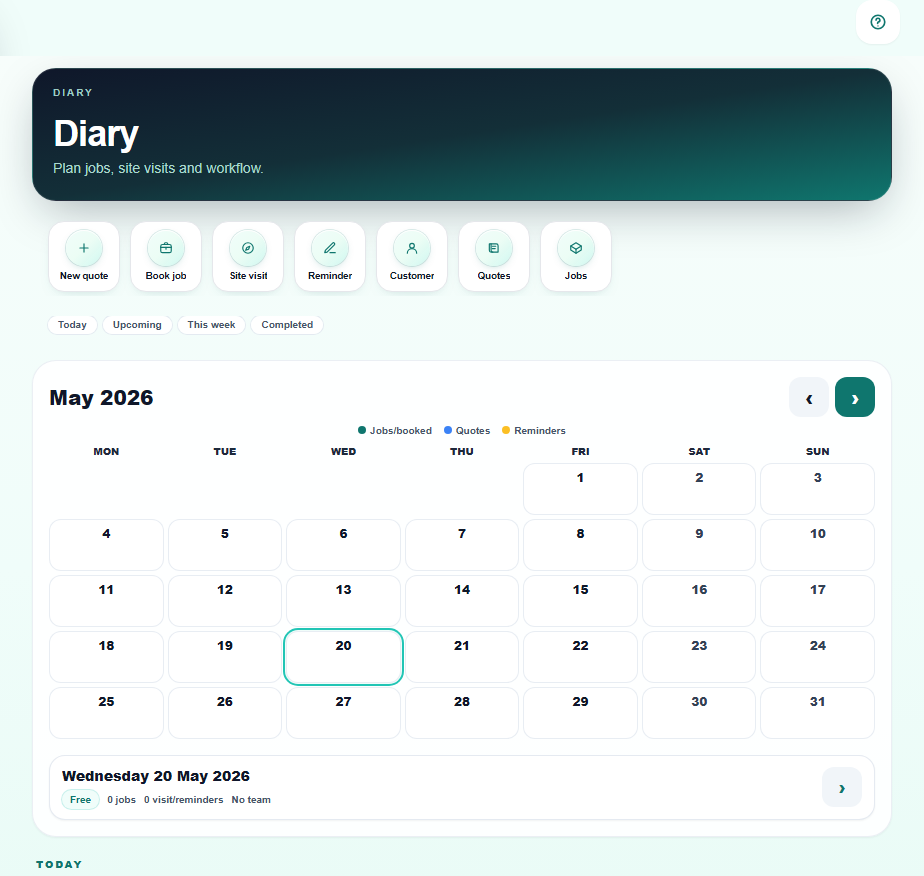
Confirmed, pending and chasing — all in one view
FAQ
- How is this different from a Google Calendar?
- Google Calendar shows dates. Pro Quoter's planner shows job context — customer name, scope, outstanding quotes and payment status on the same tap. It also separates confirmed work from pending visits so your capacity view is accurate.
- Can I book work directly from an accepted quote?
- Yes — when a customer accepts a quote, add the work date directly from the job thread. The diary entry links back to the quote, customer and scope. No retyping, no second calendar.
- Can a small team use it?
- Pro and Team plans support multiple users — lads see the shared diary, jobs are assigned and handover notes stay on the job record. Less 'did you see that text?' more 'check the job'.
- Does scheduling link to invoicing?
- Yes — once a booked job is complete, raise the invoice from the same job record. Date, scope and customer are already there. Scheduling that does not lead to invoicing is just an admin tool — Pro Quoter closes the loop.
- What happens when a booking cancels?
- Remove or reschedule the entry — the job record stays with notes and quote history so when they call back in three months you have context. Diary updates immediately.
- Can I use the planner offline or with no signal?
- Yes — check and update your diary even when the signal drops. Changes save on your device and sync when you are back online, so the van, a basement or a rural job does not leave you blind to what is booked.